DATEV PAYROLL DATA IMPORT SERVICE
Master data and absences directly in DATEV – no Excel, no detours
Personizer automatically transfers employee master data and absence periods to your tax office via the DATEV payroll import service. This eliminates the need for duplicate data entry.
- Transfer employee master data directly from Personizer to DATEV
- Automatically transfer vacation, parental leave, sick days, and other absences
- Your tax advisor will receive the data directly in the correct DATEV format
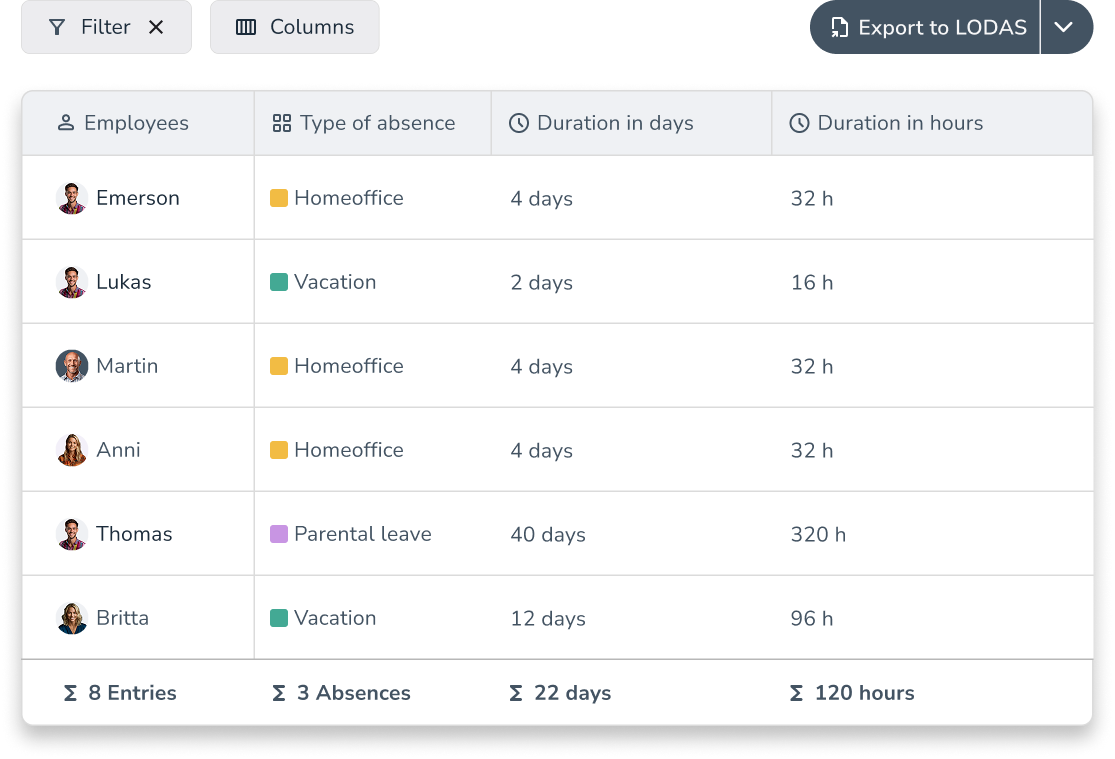
What Personizer automatically sends to DATEV
Employee Master Data
Personizer transfers your employees’ master data relevant for payroll processing directly to DATEV. This includes all the data your tax office needs for the payroll run.
Typical master data:
- First and Last Name
- Place and Date of Birth
- Address (private)
- Start Date of Employment
- Phone Number & Email Address (private)

Absences
Absence data that has been recorded and approved in Personizer is transferred directly to DATEV. Your tax advisor does not need to enter it manually.
Transferred absence types (examples):
- Vacation
- Parental leave
- Sick days
- Other relevant types of absence
What happens every month without a digital interface
New Employees: Enter Master Data Twice
Someone gets started. You enter the person’s information into Personizer, and shortly thereafter you send the same data via email or Excel to the tax office, which then enters it into DATEV again. Double the work, double the potential for errors.
Month-End Closing: Manually Compiling Attendance Lists
At the end of the month, you export vacation days, sick days, and other absences from your system, convert them to your tax advisor’s preferred format, and send everything via email. With the payroll import data service, this step is completely eliminated.
Questions, corrections, delays
Missing fields, incorrect format, wrong pay period: When you enter data manually, errors are bound to happen. Every follow-up question from the tax office wastes time for both parties and can delay payroll processing.
Three steps to automated data flow
Tax firm activates it
Your tax accounting firm uses DATEV (LODAS or Lohn & Gehalt) and enables the interface in DATEV once.
Connect to Personizer
You log in to Personizer using your consultant ID and client ID.
Data flows automatically
Personizer account with the module you want to use (time tracking, vacation planner, or personnel file)
Who benefits?
FOR HR MANAGEMENT
No more duplicate data entries
You enter master data and absences once in Personizer. Everything else happens automatically. No need to maintain data in DATEV separately, and no need to compile monthly absence lists for the tax office.
FOR MANAGEMENT
Fewer errors, faster payroll processing
When data is submitted in a structured and complete format, the number of follow-up inquiries from the tax office decreases. The payroll process runs more smoothly, and you can be more confident that the payroll calculations are accurate.
FOR THE TAX ACCOUNTING FIRM
Structured data instead of email attachments
Instead of consolidating Excel files from various sources, master data and absences are imported via the standardized DATEV interface. This saves time on data entry and reduces typing errors during data transfer.

Here’s what you need for the payroll import data service
- Your tax firm uses DATEV LODAS
- The tax firm activates the payroll import data service in DATEV once
- You log in to Personizer using your consultant number and client number
- Personizer account with the Vacation Planner or Personnel File module enabled (depending on the data being transferred)
Frequently Asked Questions About the DATEV Payroll Import Data Service
What is the DATEV Payroll Import Data Service?
The DATEV Payroll Import Data Service is an official DATEV interface that allows HR software such as Personizer to transfer employee master data and absence records directly into a tax office’s DATEV system. This eliminates the need for manual data export via Excel or email.
What data does Personizer transmit via the payroll import data service?
Personizer transfers two categories of data via the payroll import service: employee master data (the personnel data relevant to payroll processing) and absence periods (vacation, parental leave, sick days, and other types of absences).
Does the wage import data service transfer data in both directions?
No. The Payroll Data Import Service transfers data exclusively from Personizer to DATEV. To retrieve data from DATEV (e.g., salary data or payroll PDFs), Personizer uses separate interfaces: the Payroll Results Data Service and the Payroll Analysis Data Service.
Does my tax accountant need to do anything?
Yes, just once. Your tax office needs to activate the payroll data import service in DATEV LODAS. Once it’s activated, enter your consultant number and client number in Personizer. After that, the data transfer will happen automatically.
Is there an extra charge for the wage import data service?
No. The wage import data service is included in the respective Personizer modules and does not incur any additional charges. You only pay for the module you’re already using.
How long does the setup take?
Setting it up on your end takes just a few minutes: enter your advisor ID and client ID in Personizer, test the connection, and you’re done. Your tax office will handle the one-time activation in DATEV at the same time.
Which DATEV products are supported?
The payroll import data service works with DATEV LODAS. If you’re not sure which solution your tax advisor uses, just ask them. Activation only takes a few minutes after that.

No more monthly absence reports.
Try it free for 14 days. No credit card required, no setup required.

DATEV Payroll Import Data Service: Everything You Need to Know
How does the payroll import data service work from a technical standpoint?
The DATEV Payroll Import Data Service is a standardized interface provided by DATEV for data exchange with HR and payroll software. Through this interface, certified third-party providers such as Personizer can transfer data in a structured format to the tax office’s DATEV payroll system.
Personizer uses this interface to automatically transfer two categories of data: employee master data required for payroll processing, and absence times that have been recorded and approved in Personizer’s vacation planner. The transfer occurs from Personizer to DATEV, not the other way around.
A prerequisite for using this feature is that the tax office activates the interface in DATEV LODAS and provides the company with the consultant number and client number for authentication.
Why should I transfer absences via DATEV instead of using Excel?
Manually exporting absence data via Excel is still common practice in many small and medium-sized businesses, but it is error-prone and time-consuming. Vacation days must be exported from the vacation planner, formatted correctly, and sent to the tax office. If individual entries are missing or the format is incorrect, this leads to follow-up questions and delays the payroll run.
With the DATEV payroll import data service, this manual step is eliminated. As soon as an absence is recorded and approved in Personizer, it is ready for transfer to DATEV. Your tax office receives the data in the standardized DATEV format—no reformatting, no follow-up inquiries due to missing fields.
This saves time on both sides: HR or management no longer has to compile a monthly absence list, and the tax office doesn’t have to manually enter the data into DATEV.
Which HR software transfers master data to DATEV?
Several HR software solutions in the DACH market offer integration with DATEV via the payroll import data service, including HRworks, TimeTac, and Personizer. The specific level of integration varies depending on the provider.
Personizer uses the payroll import data service to transfer employee master data and absence times directly to DATEV LODAS. The interface is included free of charge in the Personizer account; there are no additional costs for the DATEV connection. In addition, Personizer offers the payroll exchange data service (eAU retrieval), the payroll evaluation data service (payroll PDFs in the personnel file), and the payroll results data service (salary data from DATEV).